How To Turn On Gourmia Air Fryer: Quick Start Guide
Press the power button, load the basket, set temperature and time, then press Start.
I’ve used several Gourmia air fryers and helped friends get theirs running. This guide walks you through how to turn on Gourmia air fryer models step by step, explains controls, covers safety checks, and offers quick fixes when the unit won’t power up. Read on to learn clear, practical steps and tips so you can start cooking confidently with your Gourmia air fryer.

Step-by-step: How to turn on Gourmia air fryer
- Place the air fryer on a flat, heat-safe surface and plug it into a dedicated outlet.
- Open the drawer and insert the cooking basket securely. Close the drawer until it clicks.
- Press the power button once to wake the unit. The display or lights will come on.
- Select the cooking mode or temperature. Use the Temp or + / – buttons for manual heat.
- Set the cooking time using the Time or + / – buttons.
- Press the Start/Resume button to begin the cycle. The fan and heating element will activate.
- Press Pause/Stop to halt cooking and remove food after the cycle ends. Use oven mitts for hot parts.
These steps work for most Gourmia models, including digital and analog versions. If your model has preset buttons, press the preset for the food type, then press Start. Always confirm the basket is locked in place before starting.
Source: gourmia.com
Know your model and controls
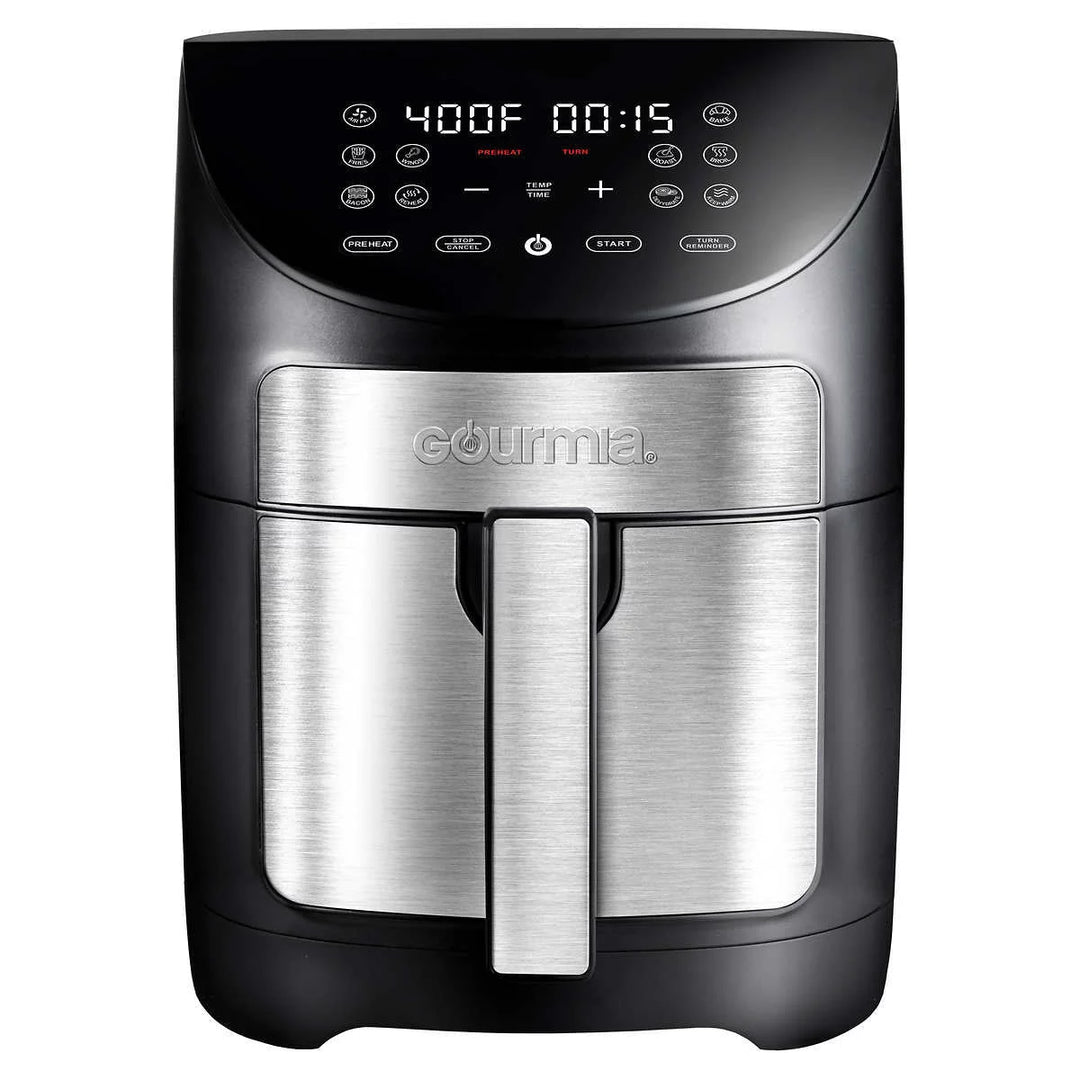
Gourmia makes several air fryer models. Controls vary by unit. Common controls include:
- Power button to turn the unit on or off.
- Temp buttons or dial to adjust heat.
- Time buttons or dial to set cooking duration.
- Preset buttons for fries, chicken, fish, and more.
- Start/Stop button to begin or pause cooking.
- Display screen showing time and temperature.
If your model has touch controls, tap lightly and wait for the display to respond. Older models use a mechanical dial; turn to set temperature and time, then pull or push the drawer to start. Read the quick guide in your manual for model-specific operation.

Source: youtube.com
Safety checks before you turn on your Gourmia air fryer
Always check safety steps first to avoid damage or injury:
- Ensure the unit is clean and dry. Remove crumbs or oil build-up inside the drawer and basket.
- Verify the power cord is intact and not frayed. Plug directly into the wall outlet.
- Keep at least 4 inches of space around the air fryer for airflow.
- Do not operate near water or on an unstable surface.
- Use the correct cookware and avoid foil that blocks air flow. Perforate foil if used.
- Preheat only if your recipe or manual instructs. Some models require preheat for best results.
These checks reduce risk and help your Gourmia air fryer turn on and work properly every time.
Source: costco.com
Troubleshooting: Air fryer won’t turn on
If your Gourmia air fryer won’t power up, try these simple fixes:
- Confirm the outlet works by testing another device. Replace fuse or reset breaker if needed.
- Unplug the air fryer for one minute, then plug it back in to reset the electronics.
- Check the drawer and basket alignment. Many models won’t start if the basket is not locked.
- Inspect the power cord and plug for damage. If damaged, stop use and contact support.
- If the display shows an error code, consult the manual for code meanings and steps.
- For persistent issues, contact Gourmia support or an authorized service center.
These steps solve most power issues. If the unit powers on but won’t heat, the heating element or thermostat may need repair.
Tips, best practices, and cooking presets
Use these tips to get better results and fewer startup problems:
- Preheat for 2 to 5 minutes when recipes call for it. This helps with crisping.
- Don’t overcrowd the basket. Leave space for air to circulate for even cooking.
- Shake or flip food halfway through the cycle for uniform browning.
- Use a light coat of oil to help crisp and prevent sticking.
- Clean the basket and drawer after each use to avoid smoke and odors.
- Save your favorite settings for consistent results. Many Gourmia models remember the last used setup.
Presets make cooking easy. Press a preset, adjust time or temp if needed, and press Start to turn on Gourmia air fryer presets quickly.
Personal experience: lessons learned using a Gourmia air fryer
I bought a Gourmia air fryer three years ago. At first, I struggled to get it to start because I hadn’t pushed the basket fully in. After that, I always check the click before powering on. I also learned to preheat for fried textures and to lightly spray food for better crisp.
Mistakes to avoid:
- Don’t force foreign objects into the basket sensors.
- Avoid using aerosol cooking sprays that can damage nonstick coating.
- Don’t ignore error codes; they usually indicate a fixable problem.
These small habits make turning on and using your Gourmia air fryer faster and safer.
Frequently Asked Questions of how to turn on gourmia air fryer
How do I turn on my Gourmia air fryer for the first time?
Plug the unit into a working outlet, insert the basket fully, press Power, set temp and time, then press Start. Follow the quick-start steps in the manual for your model’s presets.
Why won’t my Gourmia air fryer start even though it’s plugged in?
Check the basket alignment, test the outlet with another device, and reset the unit by unplugging for one minute. If the cord is damaged, do not use the air fryer and contact support.
Do I need to preheat before pressing Start?
Preheat if a recipe or the manual recommends it. Preheating for 2 to 5 minutes often improves crispness but is not required for all recipes.
Can I use foil when I turn on my Gourmia air fryer?
You can use perforated foil or a small liner that does not block air flow. Avoid covering the bottom or air vents to ensure proper circulation when you turn on Gourmia air fryer.
What does the error code mean when the unit won’t turn on?
Error codes vary by model; consult your manual for the code definitions and troubleshooting steps. If an error persists, contact customer service.
How do I reset my Gourmia air fryer?
Unplug the unit for 60 seconds, plug it back in, and press Power to restart. This simple reset often clears minor electronic glitches.
Conclusion
Turning on Gourmia air fryer is simple when you know the steps: plug in, secure the basket, set temp and time, then press Start. Follow safety checks and basic maintenance to avoid common issues. Try the recommended tips and presets to get reliable results every time.
Take action today: locate your manual, try a quick test cycle with water or fries, and leave a comment sharing your model and results. Subscribe or check other guides to get the most from your Gourmia air fryer.